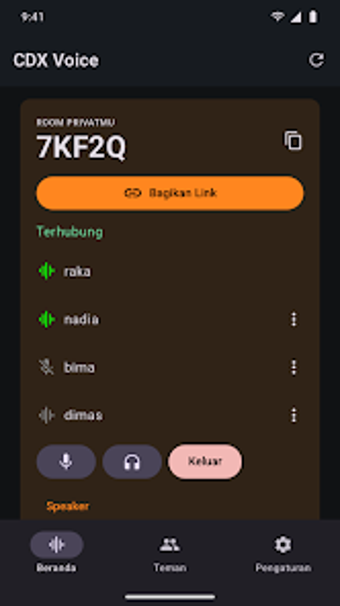
Minimal, privacy-first voice chat for gamers and small groups
Runs as a persistent background voice relay with notification-tray controls, one-tap joining and shareable room links that simplify group setup. Developed by CodeXplore for mobile and PC gamers, CDX Voice focuses on private, audio-only group chat. Key capabilities include 5-character room codes, host moderation tools and per-user mute/deafen output choices. The app fits players and privacy-conscious groups who need low system impact during gameplay and quick, private voice connections.
What CDX Voice delivers for live gaming coordination
CDX Voice keeps voice channels lightweight by running in the background and offering quick controls in the notification tray, which supports uninterrupted play and fast access. Rooms open via a 5-character code or link and the app emphasizes low resource use so it does not compete with resource-intensive games. Hosts can remove problematic participants, and participants can block or report others, which helps manage short-term gaming groups.
How private are conversations on CDX Voice?
The tool is designed with privacy in mind: voice data is relayed live and the developer states that no voice recordings are stored. Account setup only asks for a username and password rather than extensive personal details, and the platform omits public room discovery by design, making access possible only with a code, link, or direct invite.
Is notification and audio control practical during sessions?
Notification-tray controls provide quick mute, deafen, and output selection (speaker, headset, Bluetooth), so users can adjust audio without leaving a game. Host controls give moderators kick and ban powers, while individual blocking and reporting are available for participants. The one-tap joining mechanism reduces setup friction when friends share links during a match.
Does CDX Voice reach across devices without heavy footprint?
The app ships on Android and on Windows via the Microsoft Store, and the developer positions it as extremely lightweight with a small installation footprint on mobile. That design choice keeps battery and CPU use low during sessions, which suits players who need continuous voice relay while running demanding titles on their device.
Who should adopt CDX Voice and when to choose alternatives
CDX Voice is a compact option for mobile and PC gamers who prioritize low system impact and private, live voice channels during gameplay. Users who expect text threads, file sharing, or video calls will find the app limited because it focuses exclusively on audio. For quick, private voice coordination among friends or small teams, the tool is a sound match; those needing broader communication features should consider other apps.